Every drive, logged by itself.
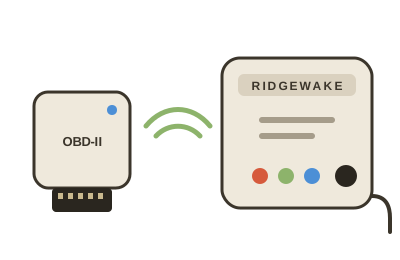
A small connector box in your car's OBD-II port and a main box anywhere in the car record every drive: speed, engine readings, fault codes and, with GPS, the route. When you park it sends them home over Wi-Fi, or through your phone. You open the app when you want to look.
No subscription for the logger. The Tracking edition adds a live map over the mobile network and has a monthly data plan (pricing).
Everything your car tells it, on your phone
Plug it in once. It starts when the car starts, and the app does the rest.
Every drive
Distance, time, top and average speed, idling, fuel, cost and CO₂ for each drive, and its route on a map coloured by speed.
Live map
With the Tracking edition: where the vehicle is now, a point every 10 seconds while it drives, and an alert if it moves with the engine off.
Data and graphs
The Data tab: totals by week or month, and every reading over time (economy, coolant, rpm, battery, your driving score) as a graph, for 30 days to all time.
3D replay
Watch a drive again: your vehicle follows the route in 3D with gauges for speed, rpm, coolant and throttle, from x0.5 to x16, in six camera views.
Trails and recorded trips
Every trip of every vehicle on one map, roads and trails alike. Record a trip with your phone, play it back, and follow a trail you have driven before.
Fuel, CO₂ and costs
Week by week: kilometres, litres, L/100 km, dollars, cost per kilometre and CO₂, at your own price a litre.
A logbook that fills itself
Mark each trip business or personal, add where and why, and save the year as a spreadsheet for your accountant.
Trouble codes in plain words
A check-engine light or a new fault code shows on the vehicle and arrives by email, with what it means: cars (OBD-II), trucks and boats (J1939, NMEA 2000).
Battery while parked
Your battery's voltage over the last days, parked and running, so a tired battery shows before it leaves you stranded.
Geofences
With the Tracking edition: draw a circle round a place and get an email when the vehicle leaves it, arrives, or both.
Sharing
Share one trip as a link, with where it started and ended hidden. Share a vehicle with family: they see its drives and codes and change nothing.
Sends itself home
Parked near your Wi-Fi or your phone's hotspot, it uploads by itself. Nowhere near Wi-Fi? Your phone takes the drives over Bluetooth.
Three steps, from the box to your phone
Plug it in
The small connector box goes in the OBD-II port under the dashboard and stays there, behind the port's little door. The main box goes anywhere in the car, on a USB car charger.
Add it in the app
Press Set up a new logger. The app finds it over Bluetooth, unlocks it with the code on its label, adds it to your account and gives it your Wi-Fi.
Drive
That is all. Each drive is recorded and arrives in the app when you park near Wi-Fi, or through your phone. Problems come to you by email.
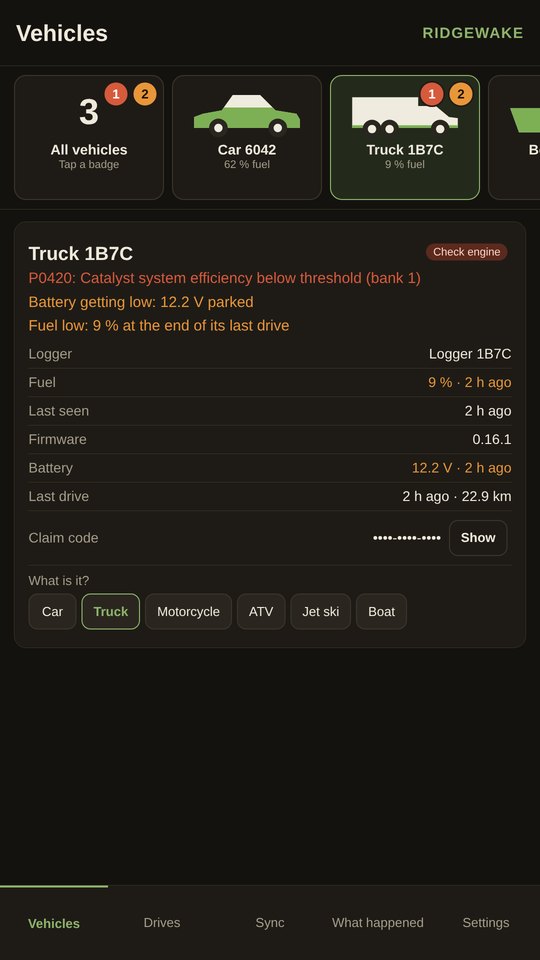
Your vehicles at a glance
As in the app: the green is how much fuel is in the tank, a red circle counts what is wrong, an orange one what needs a look.
One app, a box for each job
The logger and the Tracking edition are what the app is built for. The others share its account and its alerts.
- The logger: two boxes, every drive with GPS, no subscription
- Tracking edition: the logger with a live map over the mobile network
- K-line logger: older cars, and Honda jet skis and ATVs (in development)
Hear from us
Nothing is on sale yet. Leave your email and we will write once when the products you pick open, and, if you want it, a short Ridgewake update about once a month.
More about the list: what we send, what we keep, and how to leave.
Check back here: this page changes the day the shop opens.
Ready when you are
The logger is not on sale yet: it goes on sale once its radio testing and paperwork for Canada, the US and Europe are done. Leave your email on its page and we will write the day it opens.